I’m so happy to join The Classroom Game Nook in a “Trick or Treat” blog hop! Halloween is literally around the corner (one week away) and it’s time for teachers to go trick or treating with some awesome tips, tricks, treats, and more!
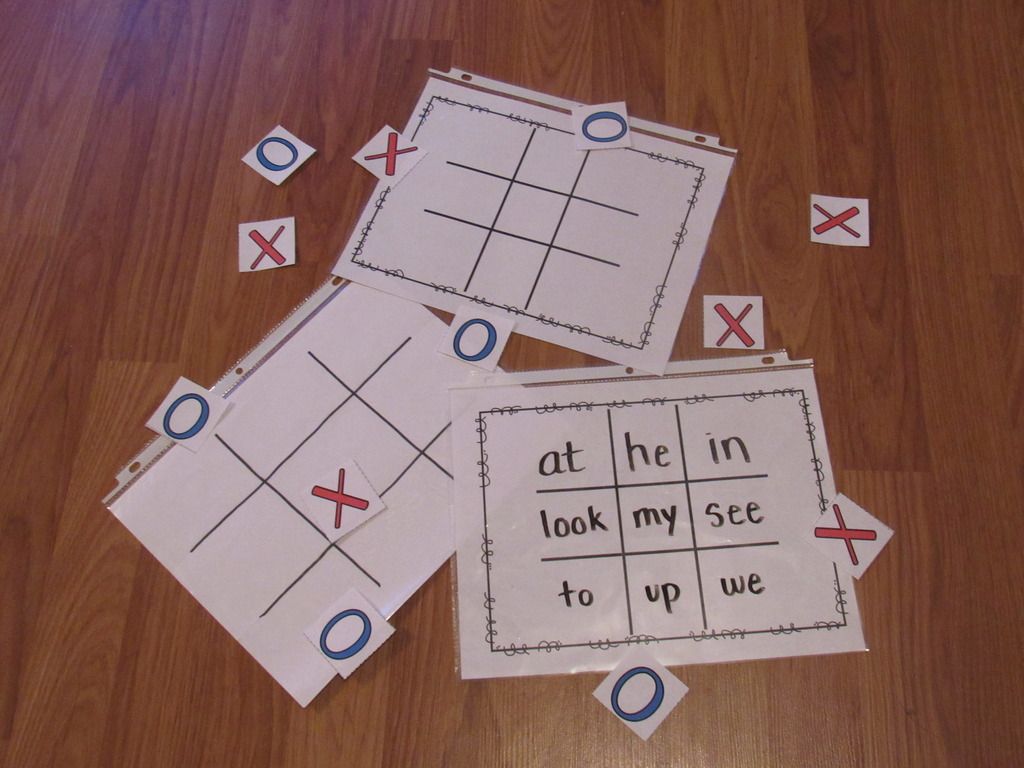
Sight words are fun. Tic-Tac-Toe is fun too! Why not put the two together?
My nephew who is in kindergarten practices his sights words every night. After a few weeks, he got tired of doing the flash cards. I decided to play Tic-Tac-Toe using his sight words. He was more than willing to play!
Set up is simple! Make a large Tic-Tac-Toe board on some paper. Write the sight words in each box.
Write X’s and O’s on some paper or index cards and you’re ready to go! The first time around, I folded a paper in thirds and just traced the lines. Later, I made some boards, X’s, and O’s on my computer and printed them out.
You can save paper by drawing a Tic-Tac-Toe board on some paper and insert it into a Sheet protector. Use a dry-erase marker to write the letters. You can change the words any time with a eraser or paper towel. You can even insert 2 pages in one sheet placed back-to-back for 2 games in 1. You also have a carrying case for your cards and dry-erase pen!
When I think of Halloween, I think of all the sweets. In particular, candy corn. You can never have to much candy core! Here’s a sweet candy corn game for your classroom.
My nephew Isaiah loves adding numbers so here’s a fun Adding to 10 powerpoint game.
This Halloween themed game has students practicing adding numbers up to ten.
It’s played with dry-erase boards so it’s perfect for small groups. You can grab this wonderful freebie here. Be sure to grab it here:
Lastly, it’s giveaway time! Halloween’s a week away, but what about Thanksgiving? Once Halloween’s over, the turkeys go into hiding! You and your students can practice counting turkeys with this fun Counting Turkeys PPT Game.
Before the big Turkey Day comes, make sure your students know how to count! Students play against the teacher as they count turkeys.
Some turkeys are in rows while others are scattered about. Great for a Thanksgiving review game. You can check out this game here:
Planning your TPT store can be a hassle. Finding the right planner can be even more of a hassle. With so many things to manage and so many different forms to choose from, I decided to make one for myself!
In 2014-2015, I created a planner to help my TPT business. You can read about the previous TPT seller here. It’s been over a year since I made it and many things have changed including my store colors, logos, and new social media. I’ve made a similar planner for TPT sellers in my TPT store. I uploaded it and designed it online at Office Depot/Office Max. It arrived on the second to last day of estimated delivery but there was something wrong: it was all in color. I wasn’t going to complain. I paid for only a few pages to be in color and the rest black and white. Believe me when I say getting 150+ pages in color can be expensive ($70 and up). I was happy with the mistake.
Here’s the cover. It’s in my store colors. It’s a “Glossy Supreme” Cardstock cover.
The next page includes my store information. After that, the next page includes the table of contents and “The Dream”. The “Table of Contents” is wrong, but I knew only a few people would actually see it. Never imagined Office Depot would send me an extra one. “The Dream” is a story about myself and why I became a teacher in the first place. Sort of motivation.
The next page started the actual planner. It includes the months from September 2015 to September 2016. Each month is in color, lists all the major holidays, the start of a new season, and reminders of when a new month of promotions opens up on TPT (the 20th of every month). Since this was mine, I added in a few reminders for myself (like mini game releases every 15th of the month). It also includes a “Notes” section for you to write down any notes for that month. I use it to write down product topics that sell really well that month. At the bottom, there’s a quote to help motivate you.
Behind each month is a set of different sheets. First is the Monthly Blog Planner and the Monthly Giveaway Planner.
The Monthly Blog Planner lays out every single day of the month and allows you plan when you wish to write a new blogpost. This is great for long term planning and if you participate in blog hops, linky parties, and more.
The Monthly Giveaway planner helps to remind you of any giveaways you signed up for or plan to do. This is perfect for tax time because every donation your make or giveaway you do is tax deductible.
Next pages include the Weekly Planner and the Monthly Overview.
In the Weekly Planner, there are 5 pages for the Weekly Planner (one for each week of the month). Each sheet has a space for each day of the week and what product you’d like to work on. I tend to work on one project a day. There is space to write upcoming events (suchs as sales, giveaways, blog hops, etc). I made a “Games to Post” section to write what I needed to post. A helpful reminder. Last, there’s space to let you know what blog posts are going out this week.
The monthly Overview is probably my favorite page! Here you can write down and keep track of your business each month. This includes followers on your social media pages, number of products and best sellers in your store, your income and expenses, and TPT rankings. There’s even an area for notes. You can read about taking end of the month inventory here.
The next section is a List of Ideas. Here you can write down any ideas you have throughout the year. There are 4 pages.
The next pages are lists of things to do “Before Posting a Product” and “After Posting a Product”.
These are reminders of what to do for your TPT products. It can be a little overwhelming so this will help to make sure your product is safe and protected. It also helps to get your product out there. You read more about “After Posting a Product” here. Next, we have the “Weekend To-Do List” and “Game Requests”.
Although I usually leave the weekends for family time, using the “Weekend To-Do List” is a great time to catch up on some things.
The “Game Request” page I made for myself because I am always asking my followers what they are working on and what they need. Sometimes they’ll request a game and I write it down but lose it. This helps tremendously!
Next, we have pages where you can list your Short Term and Long Term goals. Pretty self exclamatory.
Next is the “Graph Game Questions” and “Milestones”.
The “Graph Game Questions” I made to help remind me of some of the questions I needed to make for all my graphing games. The “Milestones” page is self exclamatory as well.
Next, you have a Newsletter Tracker and Information sheet.
Here you can track your newsletter. I use Mailchimp to send out a weekly newsletter. You can use these pages to keep track of what letter you sent out, how many members it was sent to, and if you lost or gained more subscribers. The “Newsletter Info” sheet lets you write the date for each issue, what the topic was, and (for me) what freebie was included. You can sign up for my weekly newsletter here. It’s free!
The last page is a Log-in and Password.
Here you can write down all your logs for your business. This includes the website, username, and hint. I chose hint just in case I lose the book or when I share the book. The back is a Regency. I’ve used it before and it was very durable.
I love my planner. I can’t imagine myself using anything else. I created a similar planner for TPT sellers. It’s a one time purchase and updates from year to year (free of charge).
So glad to be linking up with Teaching Blog Addiction. Here’s a Forever Freebie your students will love!
Working with place value can be loads of fun, especially if your students play against one another.In this game, boys play against girls as they making numbers using Base Ten Blocks. There’s even a type-in scoreboard for you to keep track of the score. The scoreboard can be used in slideshow mode.
There are 20 questions in all (just about enough for a class of 20). Students can take turns answering the questions individually for their team or they can work together to find the answer.
The answers range from 100 to 999, making all the answer 3 digit numbers. Students are given base ten blocks and they must figure out what number it makes.
A few teachers have used this in their classrooms and their students love it! Just look at what they said.
You can get this forever freebie in my TPT store. I hope you enjoy it!
I’m so happy to join The Elementary Entourage’s blog hop! I went to the TPT Conference in Las Vegas and loved every minute of it. Here are some of my favorite (or not so favorite) moments from this trip.
The Plane Ride
This was my 2nd flight. I had only done it once before and with friends, but here I was traveling alone and literally across the country (from NC). My first flight for Charlotte was ok, but the 2nd was awful! I got on the plane, but had to sit there for about 2 hours before the plane actually took flight. Let’s not even mention the headache and queasiness of the 4 hour flight. =(
The Palazzo Hotel Lobby
When I arrived at the Palazzo, I was beyond amazed. Never had I imaged I was going to stay in such a wonderful place. While I waited to check in, I snapped this awesome picture of the fountain in the lobby. Later on, I took some snaps outside.
My Hotel Room!
I haven’t been to Las Vegas since I was a little kid. My dad was stationed in Barstow, California and we traveled to Las Vegas twice. Each time, we stayed in a small hotel. When I went here for the conference and saw my room, I was
The Palazzo Hotel!
After settling in, I decided to take a walk and get some great photos! This was the walking area before you head to the Grand Mal Shoppes.
After a ride up the elevator, you come to the wonderful Grand Mall Shoppes. I was amazed! Never thought I’d see something so wonderful!
Everything was inside so no need to worry about rain!
You can even ride the gondolas around the entire shop.
I stopped by a few shops to see some wonderful items. I went into a Michaels Kors shop (because that’s all my mom and sister obsess over) and watched a baker at Carlo’s Bakery (Cake Boss!).
I even went to a candy shop with oversized candy boxes! Insane!
Yes, that is a regular sized can even if it is a can of Gummy Bears!
I met some wonderful sellers at the conference include Kelly Malloy of “An Apple for the Teacher” and Kathleen Guleksen of “A+ Kids”. I even got to meet Laine Sutherland from “A Little Peace of Africa” who made my business cards, logo, and blog. They have become life-long friends! Wish I had gotten a picture with them, but I know next year, I definitely will. I did get to meet Deanna Jump. I joked with her that I had never had a picture with a millionaire before.
Lastly, I live with my sister and her family. My sister didn’t want me to go. She didn’t know what she would do without me (aka missing me too much). So Thursday morning, she was going to give her kids some cereal for breakfast. Instead, they wanted pancakes. Usually, I’m the one who makes pancakes or waffles so when I wasn’t there, my niece (2) and my nephews (4 and 6) took it upon themselves to make pancakes.
My sister snapped this shot and sent it to me while at the conference (during the Opening TPT Keynote on Thursay).
I loved to trip and couldn’t wait to go again! Click the link to see more Las Vegas fun from more sellers!
It’s here, it’s here! I finally made it to 1,000 followers. I’m so excited! I wanted to have a small huge celebration. So big it would take an entire week to celebrate! Each day will includes spectacular new games, $1 Deals & freebie steals, and much, much more! You can find out more with in my 1,000 Follower Spectacular Invitation.
Let’s begin with the Gift Card giveaway of the Day! Today, you can win a permanent game license. That means every game ever made. Past, present, and future games! A prize worth over $300.
Today’s $1 Deal is for everyone. Someone requested that I make more backgrounds for powerpoint. I thought about it and decided. Why not? It’s part of my name. Why shouldn’t I have some backgrounds?
This collection includes 14 backgrounds in PNG format. I used my own clip art to create this set. Commercial friendly and easy to insert. Great for any powerpoint project.
Today’s freebie is about everyone! Since I made those backgrounds with my own clip art, I thought maybe I should offer it as clip art too.
This is my first set of clip art. I made these a while ago but never really did anything with them besides make 1 or 2 backgrounds with them. Now you can make your own as well.
Comes in 10 colors and includes a B&W version. Formats include both JPEG and PNG. Commercial friendly and easy to use.
That’s all for today. Be sure to stop by my Facebook page for some flash freebies starting at/around 5 pm EST. Click “Get Notifications” so you’ll know when they start!
It’s here, it’s here! I finally made it to 1,000 followers. I’m so excited! I wanted to have a small huge celebration. So big it would take an entire week to celebrate! Each day will includes spectacular new games, $1 Deals & freebie steals, and much, much more! You can find out more with in my 1,000 Follower Spectacular Invitation.
Let’s begin with the Gift Card giveaway of the Day! Today, you can win a $25 gift card to Amazon.com. Amazon.com has so many things to choose from! Teacher supplies maybe? Or how about a new comforter set? What about a keyboard for my iPad? I just don’t know.
Today’s $1 Deal is for everyone. Hard to believem but school will be starting back up in about a month (At least here in NC). So, to help prepare you for that day, let’s get Open House – Back to School night out of the way!
In this editable Open House presentation, you can display all you classroom information while your students browse the classroom (and find their desk).
Each slide displays a different topic. Topics include classroom information, class schedule, breakfast-lunch policy, and more. Each slide is editable and some include a picture square so you can add your own picture.
There’s 7 colored backgrounds to choose from and a blank version for you to design your own!
Today’s freebie is about you! What do you want to tell your students about yourself? Do you like coffee every morning? Do you have a pet dog named Alpha? Do play board games on rainy days? Whatever it is, tell them as your Top 10!
Get your students curious about the person they are going to spend the school year with. The set comes with slides listing the top 10 things about yourself. Comes in 7 colors and a blank slide to design yourself. You can even add photos!
That’s all for today. Be sure to stop by my Facebook page for some flash freebies starting at/around 5 pm EST. Click “Get Notifications” so you’ll know when they start!